
Everything you do with a PDF, in one place
Fill in, sign with your certificate, change the text and organize your PDFs. Free, no ads, no watermarks, and nothing uploaded anywhere.
Molino PDF comes with the other three sails, and also installs on its own. Both free.
Molino is for Windows 10 and 11 computers. Linux and Mac will come later. If you’re not at your computer right now, send yourself the link and download it there.
What for
For the paperwork we all have
-
At home
The contract someone sends you
Open it, fill in your details, sign it with your certificate or by hand, and send it back. No printing, no scanning.
-
With the authorities
The online application
Before you upload it, Molino tells you whether it’s ready to submit or what’s missing: the signature, the size, the file name…
-
With your papers
The receipts in the shoebox
Take photos with your phone and Molino makes them look freshly scanned, with the text ready to search.
What it does
What you always end up needing
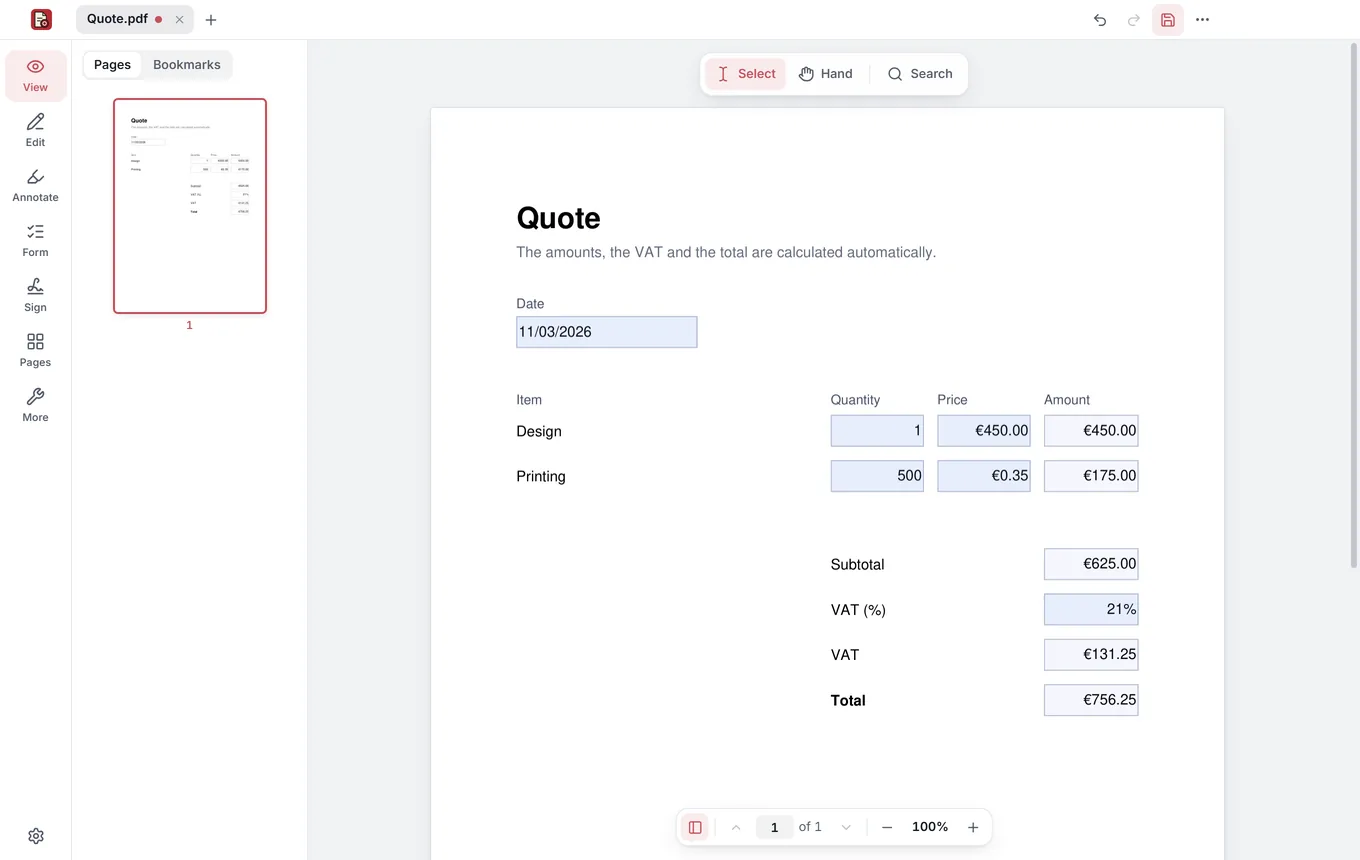
Forms that add themselves up
Type in the boxes, and the amounts, tax and total work themselves out.
Sign by hand or with your certificate
With your usual signature, or a digital certificate or ID card.
Ready to submit
Tells you whether a PDF is ready to submit, and whether the signatures you receive are valid.
Change the text and take notes
Fix a typo, highlight, underline and leave comments.
Merge, split and reorder
Combine PDFs, pull out pages and make them lighter for email.
From paper to PDF
With your phone or your scanner, with the text ready to search.
And also: black out personal data for real, add a password, print booklets and show it full screen on a projector.
FAQ
What people usually ask about Molino PDF
Can I sign with my digital certificate or ID card?
Yes. Molino PDF signs with your digital certificate: one you have in Windows (such as Spain’s FNMT certificate), the Spanish DNIe ID card or a smart card. The signature follows the European standard and carries an official time, with nothing to set up.
How do I know whether a PDF is ready to submit, or whether its signature is valid?
Open it in Molino PDF and click Check for an official submission: it tells you whether the signatures are valid, whether anyone changed it after it was signed, whether it carries an official time and whether the certificate has expired, and whether it’s ready to submit or what’s missing. It also works for signed PDFs you receive.
Can I turn paper documents into PDFs with my phone or my scanner?
Yes. Take photos of the pages with your phone, copy them to your computer, and Molino PDF finds the page in each photo, straightens it, removes the shadows and makes it look freshly scanned, with the text ready to search. It also scans directly with your scanner or printer.
Fact sheet, for the curious
- Certificate signatures
- PAdES, with a timestamp; long-term (B-LTA) too
- Check for an official submission
- Signatures, changes after signing, timestamp, certificate expiry, declared PDF/A, embedded fonts, JavaScript, attachments, file size and file name
- Text recognition
- OCR in English and Spanish
- Password
- 256-bit AES encryption
- Printing
- 2, 4, 6, 9 or 16 pages per sheet, booklets and posters
- Convert
- PDF to Word or images, and images to PDF
- System
- Windows 10 and 11, 64-bit, including Arm laptops with Windows 11
- Installation
- Microsoft Store, on its own or in Molino Suite
- License
- AGPL-3.0, free software

Your next PDF, without the hassle
Download Molino and drag in your first document. No sign-ups, no trial periods, and it updates itself.
Download Molino freeJust the PDF app? Download Molino PDF